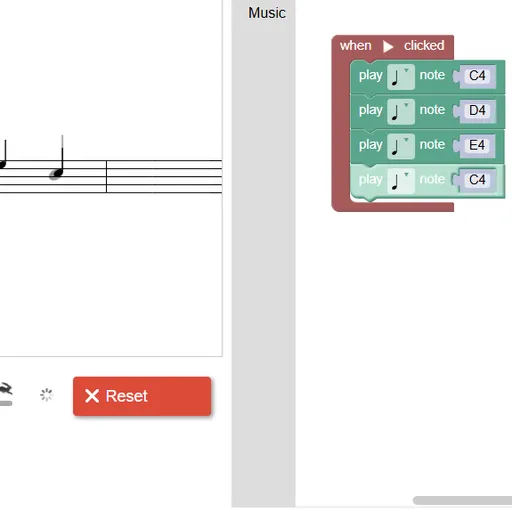
Block Code Music is a coding game where the result is a song. Instead of moving a character, your blocks play notes. A staff on the left shows the target melody as gray notes, and your program fills it in with black ones as it plays. Block Code Music uses a single familiar round to teach one big idea: functions, which let you name a phrase once and play it as often as you need.
How to Play Block Code Music
Every program lives inside a “when Run clicked” block. Drag “play note” blocks into it, set each pitch and length, and press Run Program. The game plays your notes and checks them against the target. Match it and you see the JavaScript your blocks became, plus an offer to go to the next level.
The first level asks for four notes. Level 2 tells you to play them twice without adding any note blocks, so you must wrap them in a function and call it two times. More functions follow for the later phrases, until the whole tune is complete.
After that, new blocks arrive one at a time. A set-instrument block switches to violin and other sounds, and a rest block adds silence. The final target levels use several start blocks at once, so you can delay each voice and stack them into a round. Level 10 is free composing.
Block Code Music Controls
| Action | Keyboard | Mouse | Touch |
|---|---|---|---|
| Add note, rest or function blocks | — | Click the Music category and drag a block into the workspace | Tap the category and drag a block |
| Choose a pitch | Type a note name such as D4 and press Enter | Click the note name and pick a line on the small staff | Tap the note name and pick a line |
| Choose a note length | — | Click the note symbol on the block | Tap the note symbol |
| Play or stop your tune | — | Click Run Program, then Reset | Tap Run Program, then Reset |
| Change playback speed | — | Drag the tempo slider | Slide the tempo control |
Tips and Strategies
- Name functions after phrases. Calling them “part one” and “part two” makes a long tune easy to read.
- Listen for the round. In the last target levels each voice starts later than the one before, and rest blocks set that gap.
- Use the staff as a check. Gray notes show what is still missing, so a wrong pitch is easy to spot.
- Mind the long note. One phrase ends on a longer note, so change its length instead of adding a second block.
- Give each voice an instrument. The game suggests different instruments in each start block, and the parts become easier to hear.
Features
- Ten levels built around one tune, from four notes to a layered round.
- Eight sampled instruments, including piano, violin, flute and choir.
- Live staff display that draws each note as it plays.
- Tempo slider to slow the music down while you debug.
Tested and updated: