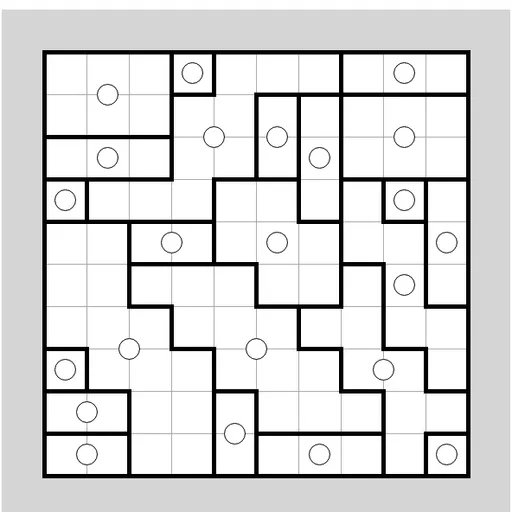
Galaxies Symmetry Puzzle shows a rectangle of squares sprinkled with small dots. You draw walls along the grid lines to cut the rectangle into regions, one region per dot. The catch is shape: each region must look exactly the same after a half turn around its own dot. This version was written by James Harvey for Simon Tatham’s Portable Puzzle Collection, and each new board is checked by a built-in solver before you see it.
How to Play Galaxies Symmetry Puzzle
Every square on the board belongs to exactly one region. Each region contains one dot, and that dot sits at its center of symmetry. Spin a region 180 degrees around its dot, and the outline must match itself perfectly.
You mark the solution by drawing walls on the lines between squares. A region counts only when it is fully closed, holds a single dot at its center, is symmetric, and has no stray wall inside it. The game highlights each region that meets all of these rules, so you can see your progress as you go. The puzzle is complete when the walls on the board are exactly the borders between different regions.
Choose 7x7, 10x10 or 15x15 boards from the Type menu, each in Normal or Unreasonable difficulty. Custom lets you set the width, height and difficulty yourself.
Galaxies Symmetry Puzzle Controls
| Action | Keyboard | Mouse | Touch |
|---|---|---|---|
| Draw or erase a wall on a grid line | Arrow keys to move, then Enter on a line | Left-click the line | Tap the line |
| Drag a reminder arrow out of a dot | Enter on a dot to pick up, Enter again to drop | Right-drag from the dot to a square | Press and hold the dot, then drag |
| Move or delete an arrow | — | Right-drag it elsewhere, or off the grid | Press and hold it, then drag |
| New game, undo, redo | N, U, R | Menu buttons above the grid | Menu buttons above the grid |
Tips and Strategies
- Mirror every square you claim. If a square belongs to a dot, the square opposite it through that dot belongs too.
- Wall off neighbors of two dots. When two dots sit in the middles of neighboring squares, the line between those squares must be a wall.
- Fill tight corners first. A square that only one dot can reach symmetrically must go to that dot.
- Use arrows as notes. Drag an arrow from a dot into a square you have assigned but not yet walled in.
- Watch for highlights. If a closed region does not light up, look for an inner wall or a broken mirror.
- Try Unreasonable only after Normal feels easy. It can require trial and error.
Features
- Six preset boards in three sizes and two difficulty levels.
- Automatic region highlighting whenever a shape is valid.
- Reminder arrows that swivel to point at their dot as you move them.
- Unlimited undo, restart and a Solve button.
- Keyboard cursor for walls and arrows, plus mouse and touch.
Tested and updated: