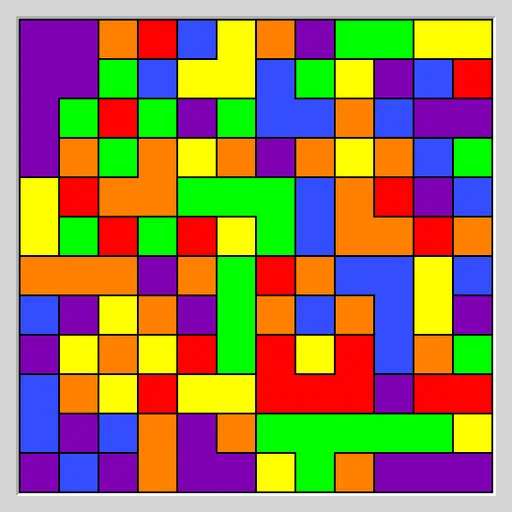
Flood Fill Puzzle starts with a grid of squares painted at random in six colors. The square in the top left corner owns a small patch, and each move repaints that whole patch in a new color. Any neighbors that already have that color join the patch, so it keeps growing. Your goal is to turn the entire grid one color before you run out of moves. The puzzle is Flood from Simon Tatham’s Portable Puzzle Collection.
How to Play Flood Fill Puzzle
Click or tap any square. The patch connected to the top left corner takes on that square’s color, and every square of the same color touching the patch becomes part of it. Squares only connect through their sides, not their corners.
The status bar under the grid shows your moves so far and the limit, such as “3 / 25 moves”. Finish with the whole board in one color at or under the limit and the status reads COMPLETED. Go past the limit and it reads FAILED.
The default board is 12x12 on Easy. The Type menu adds Medium and Hard, a larger 16x16 board, and versions with only three or four colors. Custom lets you set the width, height, number of colors (3 to 10) and how many extra moves you get.
Flood Fill Puzzle Controls
| Action | Keyboard | Mouse | Touch |
|---|---|---|---|
| Fill the corner region with a color | Arrow keys to move the cursor, then Enter | Left-click any square of that color | Tap any square of that color |
| Undo or redo a move | U / R | Undo move / Redo move buttons | Undo move / Redo move buttons |
| Start a new grid | N | New game button | New game button |
| Change size, colors or difficulty | — | Type menu | Type menu |
Tips and Strategies
- Count before you click. Look at the colors touching your patch and pick the one that adds the most squares, not just the nearest one.
- Head for the far corner early. Pushing a long arm toward the bottom right opens up many new borders at once.
- Clear out a color completely. If a color only appears next to your patch, absorbing all of it means you never have to spend a move on it again.
- Watch for small islands. A single stray square deep in the grid can cost a whole move at the end, so plan a route that collects it along the way.
- Use Undo to compare lines. Try two different orders, then keep the one that leaves fewer colors on the board.
- Beat the solver. On Hard, the limit equals the solver’s own count, and the solver is not always perfect, so finishing in fewer moves is possible.
Features
- Seven preset types plus fully custom sizes and color counts.
- A move limit set by a built-in solver, so every grid can be won.
- Unlimited undo and redo, a Restart button and a Solve button that finishes the grid for you.
- Full keyboard play with a cursor, as well as mouse and touch.
Tested and updated: