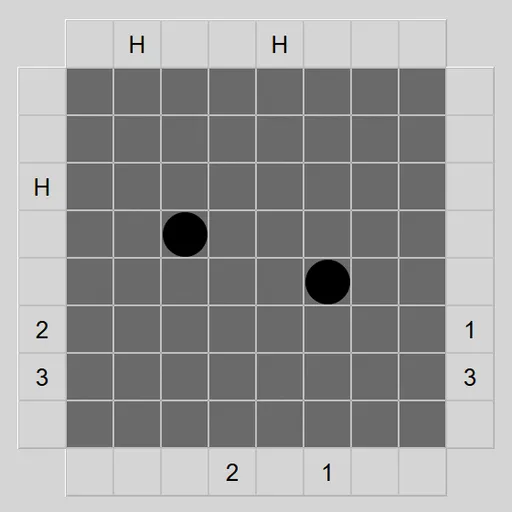
Black Box Lasers hides a handful of balls inside a dark square grid. You cannot see them, but you can fire laser beams in from any edge square and watch what comes out. Some beams pass straight through, some bend around balls, some bounce back and some never return. From those clues you work out exactly where the balls are. The game is James Harvey’s version of Black Box for Simon Tatham’s Portable Puzzle Collection, after Eric Solomon’s 1977 board game.
How to Play Black Box Lasers
Click any light square around the edge to fire a beam straight into the box. A beam travels in a line until a ball affects it. If a ball sits directly ahead, the beam is absorbed and an H appears. If a ball is diagonally ahead on one side, the beam turns 90 degrees away from it. A beam that comes back out where it entered, or that is deflected right at the entrance, shows an R.
When a beam does come out somewhere else, the same number is written at both its entry and exit squares. Beams can bend several times before leaving.
Click inside the box to place your guesses. Once you have marked the right number of balls, a button appears in the top left corner. Press it to have your layout checked. Solve reveals the answer and marks which guesses were right and wrong.
Black Box Lasers Controls
| Action | Keyboard | Mouse | Touch |
|---|---|---|---|
| Fire a laser | Arrow keys to an edge square, then Enter | Left-click a square on the edge | Tap a square on the edge |
| Place or remove a guessed ball | Arrow keys inside the box, then Enter | Left-click inside the box | Tap inside the box |
| Lock a square, row or column | Space | Right-click a square, or an edge square for its whole row or column | Press and hold |
| Check your guesses | Move to the button in the top left corner, then Enter | Click the button that appears in the top left corner | Tap the button that appears in the top left corner |
| Undo, redo, new box | U / R / N | Undo move, Redo move and New game buttons | Undo move, Redo move and New game buttons |
Tips and Strategies
- Start with the middle rows and columns. A shot down the center often tells you whether a ball is nearby straight away.
- An H points along a line. The ball sits somewhere on that beam’s path, possibly after a bend.
- Think about every cause of an R. It can mean a ball sits diagonally next to the entry square, or that the beam bent around and came back out the same way.
- Straight pass-throughs hint at an empty lane. A beam that exits directly opposite its entry usually means that row or column is clear, but two bends can cancel out, so confirm with a second shot.
- Lock what you know. Locking a cleared row or square stops stray clicks from placing a ball there.
- Fewer shots is the real game. Try to finish with as few beams as possible.
Features
- Five preset boxes plus custom width, height and ball count.
- A smart check that accepts any layout giving the same beam results.
- Lockable squares, rows and columns for marking safe areas.
- Mouse, keyboard and touch play, with unlimited undo.
Tested and updated: