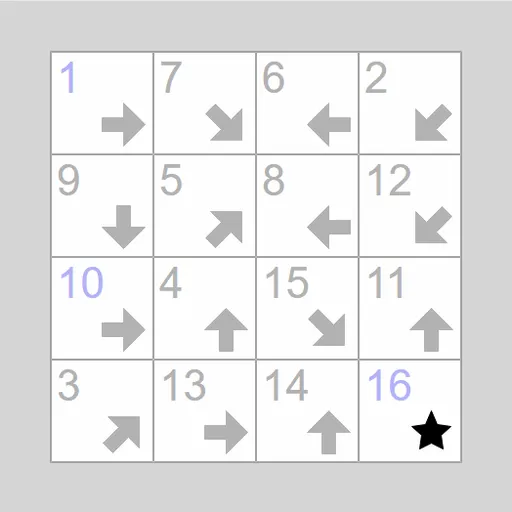
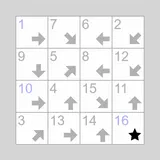
Signpost Arrow Chain is a path puzzle where every square is a signpost. Each one holds an arrow, and a few hold numbers. You link the squares into one long chain from 1 to the last number, where each arrow points in the direction of the square that comes next. It is Signpost, written by James Harvey for Simon Tatham’s Portable Puzzle Collection, and it suits players who enjoy following clues backward as well as forward.
How to Play Signpost Arrow Chain
The grid holds one square for every number in the chain, so a 4x4 board runs from 1 to 16. The first and last numbers are always shown, and the last square shows a star instead of an arrow. Some boards reveal a few numbers in between.
Square 1 points toward square 2, square 2 toward square 3, and so on. The next square can be any distance away, but it must sit along the arrow’s line, which may be straight or diagonal. When you press on a square, the game highlights the squares you could legally link it to.
Drag from a square to the one that follows it to make a link. Right-drag to link a square to the one before it instead. When a linked chain reaches a numbered square, every square in it gets its number. To undo a link, drag a square off the board. The puzzle is solved when all the squares form a single chain in order, and the Preferences menu lets you pick the style of the victory effect.
Signpost Arrow Chain Controls
| Action | Keyboard | Mouse | Touch |
|---|---|---|---|
| Link a square to the one that comes next | Arrow keys to move, Enter on the first square, Enter again on the next | Left-drag from a square to its successor | Drag from a square to its successor |
| Link a square to the one that comes before it | Space on a square, then Space again on its predecessor | Right-drag from a square to its predecessor | Press and hold, then drag (or set Tap to Link backward) |
| Break the links of one square | — | Left-drag the square off the grid | Drag the square off the grid |
| Break a whole chain | — | Right-drag any square of the chain off the grid | Press and hold, then drag off the grid |
| New game, undo, redo | N, U, R | Menu buttons above the grid | Menu buttons above the grid |
Tips and Strategies
- Work backward from the end. Only squares whose arrows point at the last square can come just before it.
- Look for squares that only one arrow on the board can reach. Whatever points there must be their predecessor.
- Count the options. A square whose arrow passes over only one unlinked square with a dot has found its successor.
- Build loose chains even before you know their numbers. Lettered pieces often snap into place once one end meets a number.
- Use the dots. A square with no dot already has a predecessor, so do not try to link anything else into it.
- If a chain gets tangled, right-drag one of its squares off the grid to clear the whole chain at once.
Features
- Six presets from 4x4 to 7x7, including free-end boards, plus custom sizes
- Legal targets highlight as you press on a square
- Temporary letter labels for chains not yet tied to a number
- Unlimited undo and redo, Solve, and drag support on touch screens
Tested and updated: