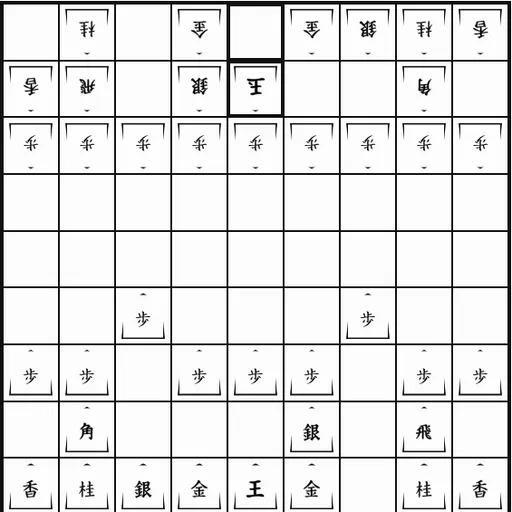
Shogi is the Japanese member of the chess family, and its big twist is the drop. Any piece you capture changes sides and waits in your hand, ready to come back onto the board as your own. This Shogi version is part of Christopher Müller’s open-source PaperGames collection. The pieces are the traditional five-sided tiles with calligraphy kanji, pointing toward the opponent. You can play either side against a computer at three levels, or hand the device back and forth with a friend.
How to Play Shogi
Black (Sente) moves first, from the bottom of the 9x9 board. The goal is to checkmate the enemy King: put it in check so that it cannot escape, block or capture the attacker.
On each turn you do one of two things. Either you move a piece on the board, or you drop a piece from your hand onto an empty square. Captured pieces lose any promotion when they enter your hand, and the hand rows above and below the board show how many of each kind both players hold.
Most pieces move only short distances. Gold and Silver generals step one square in set directions, the Knight jumps two forward and one sideways, and the Lance slides straight ahead. The Rook and Bishop slide like their chess cousins. When a piece reaches the far three rows, it may promote. Promoted Rooks and Bishops gain a one-step move in the missing directions, and smaller pieces start moving like a Gold general.
The computer’s Easy level picks random actions, Medium looks one move ahead, and Hard runs a short search over both moves and drops.
Shogi Controls
| Action | Keyboard | Mouse | Touch |
|---|---|---|---|
| Move a piece on the board | Tab to the board, arrow keys to reach a square, Enter on your piece and again on the target | Click your piece, then the square it should move to | Tap your piece, then the target square |
| Drop a captured piece | — | Click the piece in your hand row, then an empty square | Tap the piece in your hand row, then an empty square |
| Decide on promotion | — | Click "Promote" or "Don't promote" when asked | Tap "Promote" or "Don't promote" when asked |
| Choose side and opponent | — | Pick the side and a level, then click "New game" | Pick the side and a level, then tap "New game" |
| Undo or resign | — | Click "Undo" or "Resign" | Tap "Undo" or "Resign" |
Tips and Strategies
- Build a castle. Move your King a few squares to one side and surround it with Gold and Silver generals before you attack.
- Value pieces in hand. A captured Silver can land right next to the enemy King, so trading pieces is rarely neutral in Shogi.
- Think before promoting a Silver or Knight. Sometimes the unpromoted piece moves in a way that fits the attack better.
- Push a pawn to open lines. Trading pawns gives you a pawn in hand and opens a file for your Rook.
- Check the empty squares around your King. Every empty square is a landing spot for an enemy drop.
Features
- Three computer levels and a local two-player mode
- Hand rows with piece counts, plus clear Promote and Don’t promote buttons
- Drop rules, forced promotion and repetition draws handled by the game
- Undo, Resign and automatic saving of the game in progress
- Readable kanji pieces with promoted forms shown as their own characters
Tested and updated: