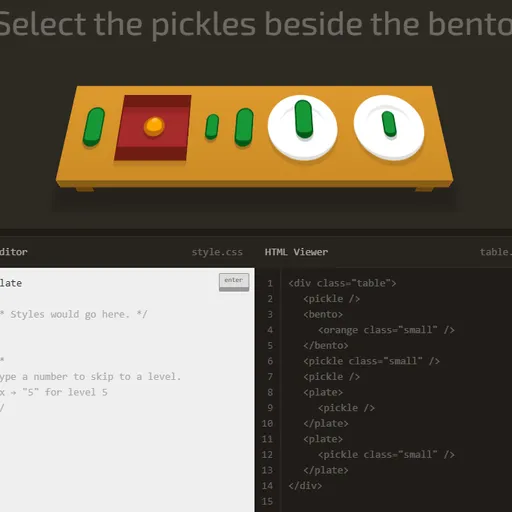
CSS Diner is a hands-on way to learn how CSS selectors work. Each level sets a small table with plates, bento boxes, apples, oranges and pickles, and a short order such as “Select the small apples.” You answer by typing the selector that would target those items in a stylesheet. The table is real HTML, so what you type is tested against actual elements, and you see right away which items your rule grabbed.
How to Play CSS Diner
The items you need to select bounce on the table. Below it, the HTML Viewer shows the markup for the whole table, and the panel on the right explains the selector that level is about, with its syntax and examples. Type your selector in the CSS Editor and press Enter.
If your selector picks exactly the bouncing items, they fly off the table, the level gets a checkmark, and the next one loads. If it picks too many, too few or nothing, the editor shakes and you can try again.
The 32 levels build on each other. You start with element types, IDs and classes, then combine them with descendants, commas and the * universal selector. Next come sibling and child combinators (+, ~ and >), followed by pseudo-classes such as :first-child, :nth-child, :nth-of-type, :only-of-type, :empty and :not(). The last levels cover attribute selectors, including the ^=, $= and *= matches. Clearing level 32 ends the game.
CSS Diner Controls
| Action | Keyboard | Mouse |
|---|---|---|
| Type a selector | Type in the CSS Editor box | — |
| Check your answer | Enter | Click the "enter" button |
| Jump to a level | Type the level number, then Enter | Open the menu (top right) and click a level |
| See an item's HTML | — | Hover over an item on the table or a line in the HTML Viewer |
| Previous or next level | — | Click the arrows beside the level title |
| Close the level menu | Esc | — |
Tips and Strategies
- Read the HTML Viewer first. The order on top describes the goal, but the markup shows the real tags, classes and IDs you can use.
- Hover to find the right element. Pointing at an item on the table highlights its line of code, and pointing at a line highlights the item.
- Count from 1 in nth selectors.
plate:nth-child(3)means the third child, not the fourth, and:nth-of-type(2n+3)style formulas skip in steps. - Mind the space.
plate applefinds apples anywhere inside a plate, whileplate > appleonly matches apples sitting directly on it. - Use the help panel’s examples. They show the exact pattern for that level’s selector, so adapt one instead of guessing.
Features
- Live HTML view: the table’s markup is shown next to the editor, and hovering links the two.
- Built-in reference: every level comes with a name, syntax line, explanation and examples.
- Level menu: jump to any level, see checkmarks for solved ones, and reset your progress.
- Quick level skip: type a number and press Enter to go straight to that level.
Tested and updated: