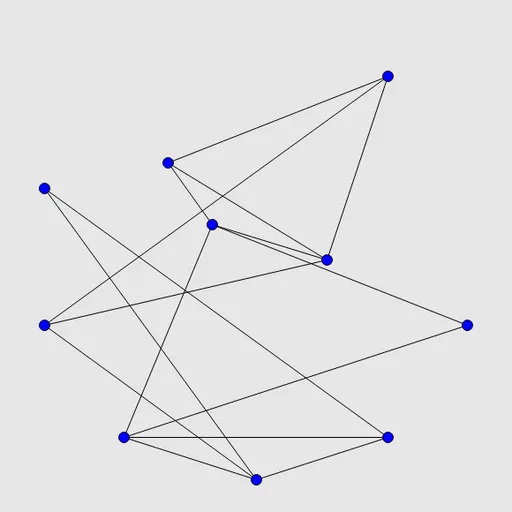
Untangle Lines gives you a set of blue dots joined by straight black lines, arranged so that the lines cross all over the place. You can drag any dot anywhere you want. The lines stay attached and stretch along with it. Your goal is to move the dots until no line crosses another. It is Untangle from Simon Tatham’s Portable Puzzle Collection, and it has a calm pace with no timer and no move limit.
How to Play Untangle Lines
Each new puzzle starts with every point placed evenly around a circle, which makes the lines cut across the middle in a messy web. Press on a point and drag it to a new spot, then let go. Every line attached to that point moves with it.
The lines themselves never change. Two points that are joined at the start stay joined, so the task is all about finding a layout. Once no line crosses any other, the board flashes to show you have solved it.
You can stop and rethink at any time. Undo steps back one drag, Restart puts every point back on the circle, and Solve shows a finished layout. The Type menu picks from 6 to 25 points, and Custom accepts any count.
Untangle Lines Controls
| Action | Keyboard | Mouse | Touch |
|---|---|---|---|
| Move a point | — | Click and drag the point | Drag the point with your finger |
| Pick and move a point by keyboard | Arrow keys or Tab/Space to choose a point, Enter to pick it up, arrows to move, Enter to drop | — | — |
| Undo, redo, new puzzle | U / R / N | Undo move, Redo move and New game buttons | Undo move, Redo move and New game buttons |
| Change the number of points | — | Type menu | Type menu |
Tips and Strategies
- Find a triangle first. Three points that are all joined to each other make a solid frame. Pull them apart and build around them.
- Move busy points last. A point with many lines is hard to place early. Settle the points with two or three lines first.
- Use the space. The circle only fills part of the board, so drag finished pieces out to the edges to clear room in the middle.
- Fix one crossing at a time. Pick a single pair of crossing lines and move one of their end points around the other.
- Turn on crossing highlights. The preference that marks crossed lines shows exactly which lines still need work.
Features
- Five preset sizes plus any custom number of points.
- Smooth dragging with mouse or finger, and full keyboard control.
- Optional helpers: grid snapping and highlighting of crossed lines.
- Unlimited undo and redo, Restart and a Solve button.
Tested and updated: