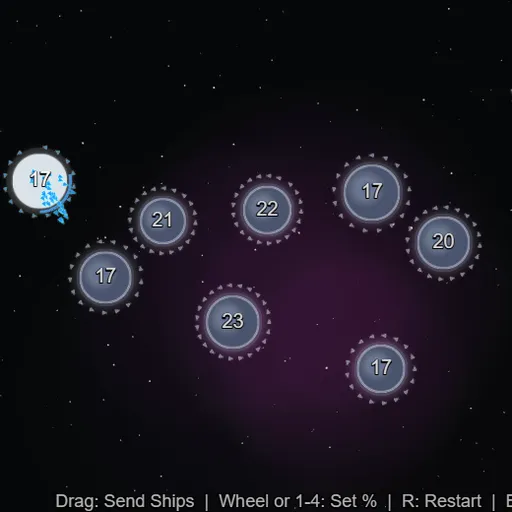
OrbitSwarm is a fast real-time strategy game played on a single screen of planets. You start with one blue home world, the computer starts with one red world, and gray neutral planets sit between you. Drag from a planet you own to any other planet to launch a stream of tiny ships. Owned planets keep building new ships, so every capture makes your side stronger. OrbitSwarm is part of Frank Force’s open-source LittleJS Arcade, and most matches last a few minutes.
How to Play OrbitSwarm
Pick EASY, MEDIUM or HARD on the title screen. Your home planet is the bright one with a blue ring, and its number shows how many ships are stationed there. Neutral planets show their defenders too, but they don’t grow until someone captures them.
Press on one of your planets, drag the line to a target and let go. By default half of the ships on that planet leave. Use the number keys or the mouse wheel to send 10%, 25%, 50% or all of them instead. Ships sent to one of your own planets add to its count, which is how you move forces to the front.
Bigger planets produce ships faster and can hold more of them. A ring around each of your planets shows how full it is, and a planet stops building at its limit. The red rival expands with the same rules. Capture every red planet to win and see your time, or lose when your last planet falls.
OrbitSwarm Controls
| Action | Keyboard | Mouse | Touch |
|---|---|---|---|
| Send a fleet | — | Press on your planet, drag to a target and release | Drag from your planet to a target |
| Set the share of ships sent | 1 = 10%, 2 = 25%, 3 = 50%, 4 = 100% | Scroll the wheel while dragging | — |
| Restart the match | R | — | — |
| Pause | Esc | — | — |
Tips and Strategies
- Grab nearby neutrals first. Small, close planets with few defenders pay off quickly because they start producing right away.
- Send a little more than you need. Planets keep producing while your ships are in flight, so an exact match may fall short.
- Don’t leave planets at their limit. A full planet stops building, so move extra ships forward.
- Hit the rival right after it attacks. It likes to send half or more of a planet’s ships at once, which leaves that planet thin.
- Use 100% sends sparingly. An empty planet is easy for the rival to take back.
Features
- Three difficulty levels that change planet count, starting ships and how smart the rival is.
- Stream combat where ships arrive and fight one at a time.
- Size-based production and capacity for every planet.
- Hidden enemy numbers that make scouting by eye part of the game.
Tested and updated: